
It’s a scenario many of us have experienced: you’re trying to find that one photo from your last vacation. You open Google Photos, type “beach,” and instantly, a collection of pictures—complete with sand, waves, and sunset skies—appears. It feels magical. You never labeled those photos as “beach.” You didn’t add descriptions or create specific albums.
So, how does it know?
The answer, of course, isn’t magic. It’s machine learning, specifically a branch of artificial intelligence called “computer vision.” While the interface you use is simple, the backend engineering that powers this search functionality is incredibly complex, involving advanced neural networks, massive data models, and a delicate balance of computational trade-offs.
The Simple Breakdown (Explain It Like I’m 5)
Before we dive into the dense engineering stuff, let’s look at the basic flow:
- Google Photos Watches Every Picture: Every time you upload or save a new photo to Google Photos, the system “looks” at it.
- It Recognizes Things: The AI has been trained to recognize thousands of different objects, scenes, and even face structures. It can tell the difference between a cat and a dog, a beach and a mountain, and your friend Dave versus your aunt Sarah.
- It Labels Each Photo: When the AI identifies something in your photo, it creates an invisible “label” (or multiple labels) and attaches it to that photo.
- You Search, It Finds: When you search for “beach,” the system just checks its internal catalog of labeled photos and shows you everything it tagged with “beach.”
- No Manual Tagging Required: The entire process happens automatically. You don’t need to do a thing.
This is the power of AI at work in your daily life. It takes a tedious, manual task (sorting and labeling thousands of photos) and completely automates it.
The Science of Convolutional Neural Networks (CNNs) in Photo Apps
While the 5-year-old explanation is accurate, it brushes over the “how.” For engineers and technology enthusiasts, the core technology is what’s truly fascinating.
Google Photos uses advanced machine learning models, primarily Convolutional Neural Networks (CNNs) and, increasingly, Vision Transformers, which are trained on incredibly massive datasets of images. These models are designed to process visual data and “learn” to identify patterns, shapes, and features.
The standard process is called Multi-Label Classification. Instead of just saying, “This photo is a beach,” the model identifies every relevant element it sees. A single image might be labeled with “beach,” “ocean,” “sunset,” “palm tree,” “person,” “sand,” and “coast.”
Visualizing the CNN Process
This entire process of analyzing and labeling happens every time you upload a photo. It’s the visual backbone of Google’s image retrieval system. We can visualize how a neural network breaks down an image.
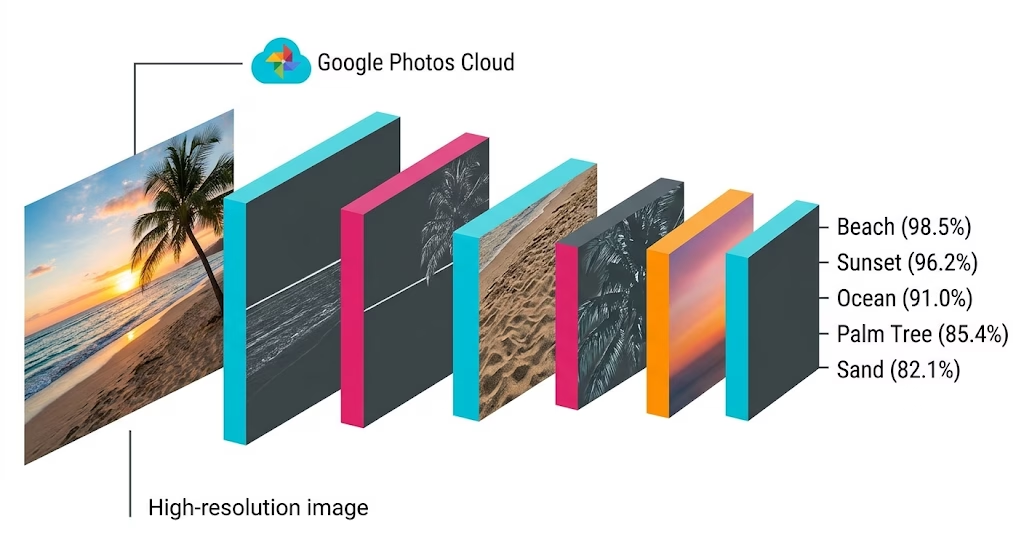
(Image Description: This infographic visualizes the multi-step pipeline of an uploaded photo. A raw image of a beach (input) passes through multiple analysis layers: Edge Detection, Pattern Recognition, and finally, Scene Classification. The output is a precise set of multi-class labels, identifying ‘Beach,’ ‘Sunset,’ ‘Ocean,’ and ‘Palm Tree’ simultaneously.)
Semantic Similarity: How “Beach” Matches “Ocean” and “Sand”
When you type “beach” into the search bar, the system doesn’t just look for the literal word “beach” attached to your photos. It uses semantic similarity.
Think about it: the model in image above identified “Palm Tree” and “Sunset” with high probability. Even if the AI model hadn’t perfectly tagged one specific photo as “beach,” its high association with related terms (“ocean,” “sand,” “coast,” “palm tree”) might still surface it in a “beach” search. This is because the system understands that these concepts are closely related. It’s searching for the concept, not just the keyword.
Engineering Trade-offs: Making it Work at Scale
Building a computer vision system that works flawlessly for one photo is a challenge. Building one that works instantaneously for billions of users, each uploading terabytes of data daily, is an engineering triumph. Achieving this scale requires navigating critical trade-offs:
1. On-Device vs Cloud Processing: Balancing Privacy and Accuracy
This is one of the most significant architectural decisions.
- The Cloud: Image recognition for scene and object identification (like identifying a “beach”) typically runs in the cloud. Cloud-based models are massive, extremely accurate, and can be updated instantly.
- On-Device: For privacy-sensitive features, like Face Grouping (matching your face across photos), the heavy lifting is often done on your device. This keeps biometric data secure, but limits the complexity and accuracy of the model, which must respect the battery and processing power of your phone.
2. Privacy vs. Feature Richness
Users demand powerful features (like automatic organization), but they also demand privacy. If Google Photos only processed images on-device, its feature set would be significantly reduced. But running models in the cloud means analyzing private photos. Managing user trust while maximizing utility is an essential trade-off.
3. Processing Cost per Photo vs. Catalog Completeness
Running a CNN on every uploaded photo requires significant compute time (and energy cost) on Google’s servers. The cost scales linearly with the number of photos. Engineers must optimize the inference time of the models. They need a system that is accurate enough to classify images correctly, but fast and cheap enough to run on trillions of images without being cost-prohibitive.
4. Model Updates vs. Label Consistency
New models come out constantly. When Google updates the CNN to be more accurate, do they re-process every photo ever uploaded? If they do, the cost is staggering. If they don’t, your new photos will be labeled using different standards than your old ones, leading to potential inconsistency in search results.
Why Automatic Image Labeling and Search Matters
The ability of Google Photos to automatically “know” your content is more than just a clever search function. It changes how we interact with our digital history.
- Effortless Organization: It removes the cognitive load and friction required to organize memories. We no longer have to build folders like ‘Beach 2018.’
- Dynamic Memories: It powers features like the “Rediscover this Day” notifications and the ability to find photos of specific people as they age.
- The Foundation for Future AI: The labeled image data provides the foundational visual catalog required for complex generative AI tasks and personalized memory creation, which we are seeing develop now.
The “beach” search results might look like magic, but they are a daily demonstration of how massive-scale machine learning is fundamentally redefining the way we capture and retrieve our lives.
If you want to see the running-your-own-model side of machine learning, my guide on building llama.cpp with CUDA 13 to run a Qwen3 MoE on your own GPU walks through the full no-sudo setup, every flag explained.